![Loom_Analytics_Logo_Transparent.png]](https://support.loomanalytics.com/hs-fs/hubfs/Loom_Analytics_Logo_Transparent.png?height=40&name=Loom_Analytics_Logo_Transparent.png)
Confidence Monitoring plays the audio back with a short delay. You can compare what was said with the text on screen and correct errors in real time. For court records, where accuracy matters most, we recommend using it every time.
- Go to Settings ▸ Capture and set the Monitoring Delay between 0 and 15 seconds.
- Start your recording.
- Click the Confidence Monitoring (headphones) icon on the toolbar. Playback begins from the delayed position.
- Click the icon again to turn Confidence Monitoring off.
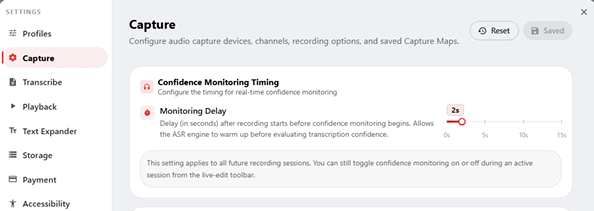
Note: A delay of 0 means playback follows the live position with no review gap. The delay setting applies to all future sessions, and you can still toggle monitoring on or off during any session.