![Loom_Analytics_Logo_Transparent.png]](https://support.loomanalytics.com/hs-fs/hubfs/Loom_Analytics_Logo_Transparent.png?height=40&name=Loom_Analytics_Logo_Transparent.png)
How to Check If Your Microphone is Working:
Step 1: Open Google Chrome (recommended browser).
Step 2: Go to https://app.loomclaudio.com/claudiouk/claudiolive.
Step 3: Click the site information icon next to the website address.
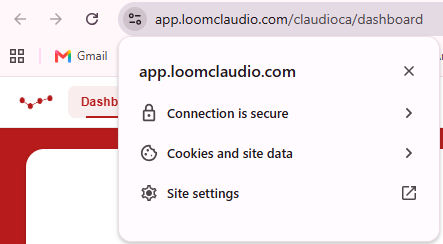
Step 4: Check that Microphone permissions is set to Allow, and confirm it is working properly.
Step 5: Select the microphone device from the list shown on the page.
Step 6: Speak normally into your microphone and check the audio level metre.
Success! If the audio bars move, your microphone is working.
If the microphone is not working:
1. Click the lock/site settings icon again.
2. Ensure Microphone is set to Allow.
3. Refresh the page.
4. Select the correct microphone again.
Microphone still not working?
1. Ensure microphone is plugged in.
2. Check microphone is not muted.
3. Close apps like Zoom/Teams/Discord.
4. Try a different microphone.