![Loom_Analytics_Logo_Transparent.png]](https://support.loomanalytics.com/hs-fs/hubfs/Loom_Analytics_Logo_Transparent.png?height=40&name=Loom_Analytics_Logo_Transparent.png)
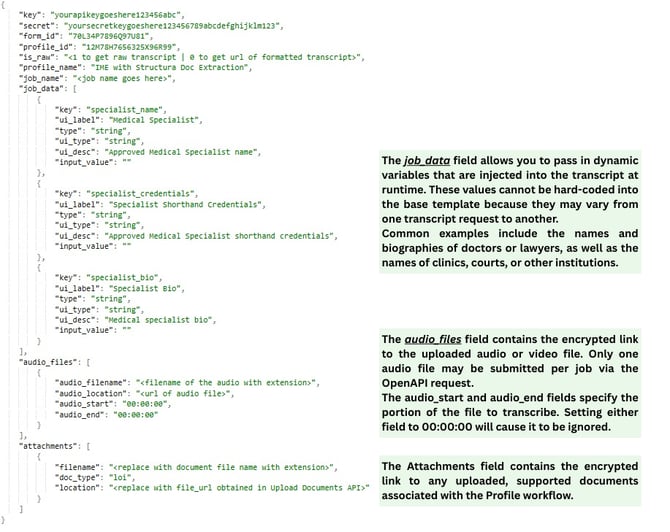
Description: Use this call to submit a new job for transcription to Loom Analytics.
- If more than one audio or document is being submitted through a single job, use the Upload Audio and/or Upload Document call to upload one audio/video or document at a time to receive a separate link for each upload. Provide a separate link for each file, as per the sample code in the audio and document arrays, respectively.
- Audio/video files can be trimmed to request partial transcripts using the HH:MM:SS format to set start and end times, as per the sample code.
- For job profiles that are expected to return an MS Word document, if "_raw" is set to 1, then the finished "_transcript" key would be an array of file URL's that contain the transcript MS Word document.
Parameters:
|
Name |
Description |
Usage |
Type |
Required |
|
Key |
API Key provided |
In Request Body |
Text |
True |
|
Secret |
API Secret provided |
In Request Body |
Text |
True |
|
Sample Job JSON |
Sample Job JSON |
In Request Body |
Text |
True |
Sample Request JSON:
{
    "key": "yourapikeygoeshere123456abc",
    "secret": "yoursecretkeygoeshere123456789abcdefghijklm123",
    "form_id": "70L34P7896Q97U81",
    "profile_id": "12M78H7656325X96R99",
    "is_raw": "<1 to get raw transcript | 0 to get url of formatted transcript>",
    "profile_name": "IME with Structura Doc Extraction",
    "job_name": "<job name goes here>",
    "job_data": [
        {
            "key": "specialist_name",
            "ui_label": "Medical Specialist",
            "type": "string",
            "ui_type": "string",
            "ui_desc": "Approved Medical Specialist name",
            "input_value": ""
        },
        {
            "key": "specialist_credentials",
            "ui_label": "Specialist Shorthand Credentials",
            "type": "string",
            "ui_type": "string",
            "ui_desc": "Approved Medical Specialist shorthand credentials",
            "input_value": ""
        },
        {
            "key": "specialist_bio",
            "ui_label": "Specialist Bio",
            "type": "string",
            "ui_type": "string",
            "ui_desc": "Medical specialist bio",
            "input_value": ""
        }
    ],
    "audio_files": [
        {
            "audio_filename": "<filename of the audio with extension>",
            "audio_location": "<url of audio file>",
            "audio_start": "00:00:00",
            "audio_end": "00:00:00"
        }
    ],
    "attachments": [
        {
            "filename": "<replace with document file name with extension>",
            "doc_type": "loi",
            "location": "<replace with file_url obtained in Upload Documents API>"
        }
    ]
}
Expected Response:
{
    "msg": "SUCCESS: Job[Job_Name] submitted successfully.
           Your webhook is configured successfully for the current job.
           We will send a notification to the webhook URL when the
           job is completed.",
    "poll_endpoint": "<endpoint of polling API>",
    "job_reference_id": "<job_reference_id of the job submitted>",
    "return": "msg, poll_endpoint, job_reference_id"
}
Expected Responses:
|
Status |
Meaning |
Description |
|
200 |
OK |
Job submitted successfully |
|
400 |
Bad Request |
Unexpected error occurred |
|
401 |
Unauthorized |
User not authorized |
|
500 |
Internal Server Error |
Internal Server Error |
Next: Poll Job - The Loom Analytics API is an asynchronous API, and you will need to periodically poll the status of the job after submitting it to get the link(s) for the completed transcript(s).