![Loom_Analytics_Logo_Transparent.png]](https://support.loomanalytics.com/hs-fs/hubfs/Loom_Analytics_Logo_Transparent.png?height=40&name=Loom_Analytics_Logo_Transparent.png)
TIP: You can learn how to submit a file to Claudio here.
Sometimes when you submit files to be transcribed, you don't necessarily need the entirety of the recording in a text format. This step-by-step guide will show you how you can transcribe portions of a recording.
From the Advanced Transcript Request Form field, select the transcription service you need, then click View.
-gif-1.gif?width=688&height=357&name=11-20-2025%20(13-43-28)-gif-1.gif)
On the Upload Audios page, upload your media file by clicking the Upload File button.
-gif-1.gif?width=688&height=416&name=11-20-2025%20(14-59-23)-gif-1.gif)
NOTE: If you are not sure which file types Claudio accepts, click here to find out.
After the file has finished uploading, use the Audio Start and Audio End fields to specify the exact points in your media file where the transcription should begin and end.
Note: The format for these fields is HH:MM:SS (hours:minutes:seconds).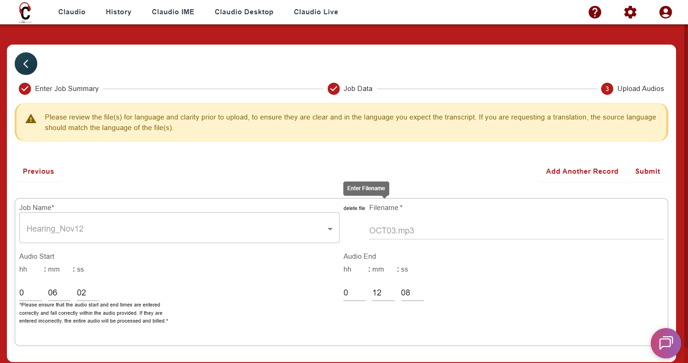
CAUTION: Refer to the source media timestamps when using this feature. For example if you have a 10 minute recording and you want only the last 2 minutes transcribed, you would enter: Audio Start: 00:08:00 and Audio End: 00:10:00. The transcription will start from the 8th minute until the 10th.
Note: Please provide the Start Time and End Time in the audio (hh:mm:ss format), rather than the actual time of day when the event occurred (e.g., 02:12:20 P.M.) during the hearing.
You can also change the order in which your media files will be transcribed. To do this, locate the file you want to reorder, then click the ^ button to move it up or the v button to move it down. These buttons are located near the top of the filename field.
-gif.gif?width=688&height=362&name=11-20-2025%20(15-45-35)-gif.gif)
To remove a file from the job entirely, click the X button above the filename field.
Once you have finished editing the job, click Submit.
-gif.gif?width=688&height=363&name=11-20-2025%20(15-47-15)-gif.gif)
NOTE: You can find out how to track the progress of your jobs and retrieve your finished transcripts here.